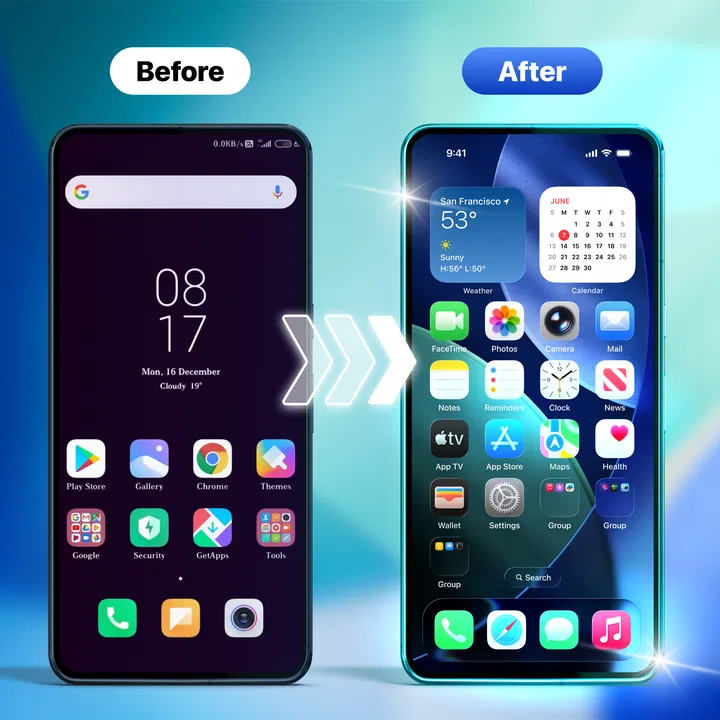
Launcher iOS 26 Theme
- 4.0
- Rating
- 100.00K
- Installs
- Free
- Price

 Analysis by App-foxy
Changing the look of an Android phone usually sounds easier than it is. A new wallpaper takes seconds, but creating a consistent visual style often means adjusting icons, spacing, folders, and habits one piece at a time. Launcher iOS 26 Theme approaches that problem with a simple idea: make an Android home screen feel closer to an iPhone-style interface without asking the user to rebuild everything manually.
After spending time with it, my view is fairly clear. This is a useful personalization app for someone who wants a familiar iOS-inspired appearance and prefers a quick visual makeover over deep Android customization. It is less convincing for people who want complete control, advanced automation, or a launcher that changes the way they manage apps rather than mainly changing how the home screen looks.
The app is free, aimed at Everyone, and comes from Amobear Application - Avntech Master Tools. Its store summary presents the central purpose plainly: transforming the home screen with iOS themes. That focus is also its main strength. It does not try to be a general productivity tool or a complicated power-user dashboard.
You May Also Like

 Blood Strike: 2.5 Anniversary
Blood Strike’s Loadouts Turn Every Drop Into a Tactical Gamble
A close look at Blood Strike’s custom loadouts: how fast access to signature weapons reshapes its battle royale rhythm, rewards preparation, and narrows the gap between fights.

 Pandora - Music & Podcasts
Pandora’s Music Is Easy to Start, but Harder to Recover
Pandora’s strength is its low-effort path from a seed to a station. Its weak spot is how much confidence it asks you to place in connection, setup, and quiet recovery.

 8 Ball Pool
8 Ball Pool Is Built on Rivalries, Rematches, and Routine
A close look at the rivalries, rematches, shared routines, and unanswered safety questions that turn a quick pool match into a persistent mobile community.

 Samsung Music
Samsung Music’s Quiet Strength Is Playing What You Already Own
Its reach comes less from spectacle than from dependable access to a personal library. That simplicity is both the app’s strongest retention engine and its ceiling.

 AccuWeather: Weather Radar
AccuWeather Review: A Quick, Clear Forecast for Everyday Decisions
For everyday plans, the best forecast is the one you can understand quickly. AccuWeather makes rain timing, radar, and local conditions easy to act on, with a few trade-offs.

 Hill Climb Racing
Why Hill Climb Racing Still Turns Crashes Into One More Run
A tiny car, a bumpy hill and one more upgrade: Hill Climb Racing keeps resurfacing because its simple chaos makes every near-miss feel personal.
More From Our News Desk



How the iOS-inspired approach feels in daily use
The first thing I noticed is that the appeal depends on consistency. An iOS-style theme looks best when the wallpaper, icon treatment, folders, and home-screen arrangement work together. If only one element changes while the rest of the phone keeps a strongly traditional Android appearance, the result can feel unfinished. I recommend taking a few minutes before applying the theme to decide which apps belong on the first screen and which can stay out of sight.
That small preparation makes a bigger difference than simply activating a theme and leaving the existing layout untouched. A crowded home screen can undermine the clean appearance many people want from an iPhone-inspired design. I found that grouping less-used apps and keeping the main screen focused on everyday tools made the visual style feel more deliberate.
The app belongs in the personalization category, but its usefulness is not limited to people who want to imitate another platform exactly. It can also suit someone who wants a calmer home screen, a more uniform icon presentation, or a different visual routine after using the same Android layout for a long time. In that sense, the iOS reference is a design direction rather than the only reason to try it.
Its current version is 1.2.2, and the app requires Android 11 or later. That requirement is worth checking before downloading, particularly if you are using an older phone that still performs well for your needs. Compatibility is not just a technical detail here: launcher and theme behavior can be closely tied to the Android version and the phone maker’s own interface.
A practical morning scenario
Imagine a person who has just moved from an iPhone to an Android phone. The hardware may be fine, but the home-screen layout feels unfamiliar, and the transition creates small annoyances every time the phone is unlocked. An iOS-inspired launcher theme can reduce that visual gap. The user can place the most important apps where they expect them, keep the first screen uncluttered, and make the phone feel less foreign without replacing the entire device.
I would also recommend it to someone preparing a phone for a family member who prefers a straightforward, recognizable layout. The important point is to keep the arrangement simple rather than filling every available space. A theme cannot solve confusion caused by too many shortcuts, so the best result comes from combining the visual change with sensible organization.
Where it is stronger than ordinary wallpaper changes
A wallpaper app changes the background, but it rarely creates a complete visual direction. Standard icon packs can improve consistency, yet they often require separate launcher settings and manual placement. A full alternative launcher may offer more control, but that extra flexibility can also mean more menus, more decisions, and more time spent tuning the result.
Launcher iOS 26 Theme sits between those options. It is more purposeful than changing a picture behind the icons, while appearing more approachable than a highly configurable launcher. That middle position is valuable for casual users. I would not describe it as the best tool for every Android owner, but I can see why it has attracted over 100 thousand installs and an average rating of 4.0 from roughly 369 ratings.
The rating suggests a generally positive reception without proving that the experience is perfect for every phone. I treat that as a reason to approach the app with realistic expectations. A theme can look polished on one device and less natural on another because Android manufacturers arrange settings, gestures, widgets, and default launchers differently.
The trade-off between a quick result and deeper control
The biggest advantage is also the main limitation: the app is centered on achieving a recognizable style quickly. If your priority is a fast visual refresh, that focus is welcome. If your priority is designing every detail yourself, the same focus may feel restrictive.
For example, a dedicated customization launcher may be better for users who want precise grid choices, extensive widget placement, gesture mapping, icon-pack compatibility, or several separate home-screen profiles. I would choose that kind of alternative when the home screen is part of a larger productivity system. Launcher iOS 26 Theme makes more sense when the visual identity matters more than building a highly personalized workflow.
There is another practical trade-off. An iOS-inspired arrangement may look clean, but Android users often rely on widgets, app drawers, notification shortcuts, and manufacturer-specific features. If you frequently place information-dense widgets on the first screen, a themed layout may not match your existing habits as well as a conventional Android launcher. In that situation, the familiar alternative could remain more efficient even if it looks less distinctive.
Small setup choices that improve the result
My first tip is to take a screenshot of your existing home screen before making changes. That gives you a visual reference when you decide whether the new arrangement is genuinely easier to use or merely different. It also helps you restore your preferred organization if the theme does not suit your routine.
My second tip is to test the layout with one day of normal use rather than judging it immediately. The first impression is mostly visual, but the real question is whether your thumb finds the same apps naturally. Keep your most frequently opened apps in predictable positions, and avoid copying an arrangement that looks authentic but slows you down.
A third useful approach is to separate appearance from access. Put only essential shortcuts on the main screen and use folders for occasional apps. This prevents the iOS-inspired style from becoming a decorative layer over a cluttered layout. It also makes it easier to decide whether the app is improving your phone or simply hiding an organizational problem.
Finally, compare the themed layout with your phone’s original launcher after several unlocks throughout the day. Do not judge only by screenshots. Notice how quickly you reach messaging, maps, camera, settings, and the apps you use for work. That comparison reveals whether the theme is helping your routine or asking you to adapt for the sake of appearance.
What may frustrate experienced Android users
People who enjoy Android precisely because it allows extensive customization may find the iOS-inspired direction too narrow. The app’s concept is easy to understand, but that does not mean every user will find the final arrangement flexible enough. Some users want to mix visual styles, preserve a manufacturer’s widgets, or create a layout that no other platform resembles. For them, a more open launcher is likely the better choice.
I would also avoid recommending it as a solution for someone expecting an Android phone to become an actual iPhone. A themed home screen can influence the appearance and first impression, but it does not reproduce the complete operating system experience. Core Android behavior, device-specific settings, notifications, and app interactions still belong to the phone underneath.
That distinction matters because imitation can be useful when it reduces a learning curve, but disappointing when it creates unrealistic expectations. If you want a visual bridge during a platform switch, the app is worth considering. If you want identical system behavior, it is the wrong type of tool.
Who should install it, and who should skip it
I think this app is a good fit for casual Android users who want a noticeable home-screen change without spending a long time comparing customization menus. It is especially suitable for people who like the clean, organized feel associated with iOS and are comfortable treating the theme as a visual layer rather than a complete replacement for Android.
It can also work well for a temporary refresh. Maybe you have used the same phone layout for years, moved from another platform, or want a simpler arrangement before handing a device to someone else. Because it is free, experimenting is easier than committing to a paid customization package, although I still recommend checking how comfortable the layout feels during ordinary use.
I would suggest skipping it if your phone is below Android 11, if you depend heavily on a carefully arranged widget dashboard, or if you already use a launcher with a finely tuned workflow. I would also point experienced customization fans toward a broader launcher when they need advanced controls rather than an iOS-inspired appearance.
The age rating of Everyone makes the app approachable for a broad audience, but age suitability should not be confused with universal usefulness. A simple visual concept can be accessible while still being a poor match for someone with specialized accessibility, productivity, or navigation needs. The right question is not whether the style looks attractive in isolation; it is whether the new layout remains comfortable after repeated daily use.
What the reception and developer details suggest
Amobear Application - Avntech Master Tools has positioned this release around a focused personalization idea rather than a broad collection of unrelated tools. That focus helps the app communicate its purpose quickly. The short store description, “Launcher iOS 26,” is brief, so the real decision comes from considering how much of your phone experience you want to change.
With a 4.0 average and around 369 ratings, the reception looks encouraging but not definitive. I would not use the rating alone to decide. Launcher behavior can vary noticeably between devices, and your own expectations matter more here than a single overall score. Someone seeking a fast cosmetic refresh may be satisfied, while someone seeking deep control may rate the same approach as limited.
The app has passed 100 thousand installs, which gives it a meaningful user base for a focused personalization product. Still, popularity does not remove the need to evaluate fit. A launcher theme is unusually personal: the same design that feels tidy to one person can feel restrictive to another after a few hours.
My final assessment
Launcher iOS 26 Theme succeeds when judged on its clearest promise: it gives Android users a convenient way to move toward an iOS-inspired home-screen appearance. I like that the concept is easy to understand, and I appreciate that it can provide a stronger transformation than a wallpaper alone without demanding the complexity of a full power-user launcher.
Its limitations are equally clear. It should not be treated as a complete iPhone simulation, and it may not satisfy users who want detailed control over every part of their Android workflow. The most convincing results come from pairing the theme with thoughtful app placement, restrained folders, and a willingness to test the layout in real situations rather than judging it from the first glance.
My recommendation is simple: try it if your main goal is a free, iOS-inspired visual refresh on a compatible Android phone. Give it a pass if your priority is advanced launcher customization, extensive widget work, or preserving a carefully optimized Android setup. For the right audience, it is an approachable way to make a familiar device feel new again; for everyone else, a more configurable launcher will probably offer better long-term value.
FAQs for Launcher iOS 26 Theme
01What is Launcher iOS 26 Theme, and what does it do?
Launcher iOS 26 Theme is an Android customization app designed to give your phone an iPhone-inspired appearance. After installation, it can change the home screen layout, icons, wallpapers, widgets, folders, and some visual effects. It does not turn Android into iOS or provide Apple-exclusive system features; instead, it creates a similar look through a launcher and optional customization tools.
02Is Launcher iOS 26 Theme safe to install and use?
The app should be downloaded from a reputable source, such as the official Google Play Store, because third-party APK websites may distribute modified or unsafe versions. During setup, review every permission request carefully. A launcher may need access to display the home screen, while requests unrelated to customization deserve caution. Also check the developer information, recent reviews, update history, and privacy policy before continuing.
03Will Launcher iOS 26 Theme slow down my Android phone or drain the battery?
Performance depends on your device, Android version, installed widgets, animations, and background services. On newer phones, the launcher will usually run smoothly, although animated effects or frequently updated widgets may use additional memory and battery. Older or entry-level devices could experience slower transitions. If performance changes after installation, disable unnecessary animations and widgets or switch back to your original launcher.
04Can I customize the appearance after applying Launcher iOS 26 Theme?
Most versions provide several customization options, such as changing wallpapers, icon styles, layouts, widget placement, animation effects, and the appearance of folders or the app drawer. However, the exact tools can vary between releases. Some themes or features may require watching advertisements or making an in-app purchase. Before applying changes, check whether the launcher supports your preferred icon packs and Android widgets.
05How can I remove Launcher iOS 26 Theme and return to my normal launcher?
You can normally return to your previous Android interface by opening Settings, going to Apps or Default Apps, selecting Home App or Default Home App, and choosing your original launcher. After that, uninstall Launcher iOS 26 Theme like any other application. If icons or widgets appear different afterward, you may need to restore your previous home-screen layout manually, since launcher settings are not always preserved.
Pros
- Gives Android phones a familiar iPhone-inspired home screen style.
- Includes iOS-like icons and visual elements for a more polished appearance.
- Offers a simple way to refresh the look of an older Android device.
- Usually supports quick access to app shortcuts and customization options.
- Easy to install and try without replacing the phone’s operating system.
Cons
- Some features may require intrusive permissions to work properly.
- Advertisements can interrupt setup or appear during regular use.
- Performance may feel slower on budget phones with limited memory.
- iOS-style visuals do not provide actual Apple apps or iPhone functionality.
- Updates and compatibility may vary between Android devices and versions.

Launcher iOS 26 Theme
Gallery